
1. Registration
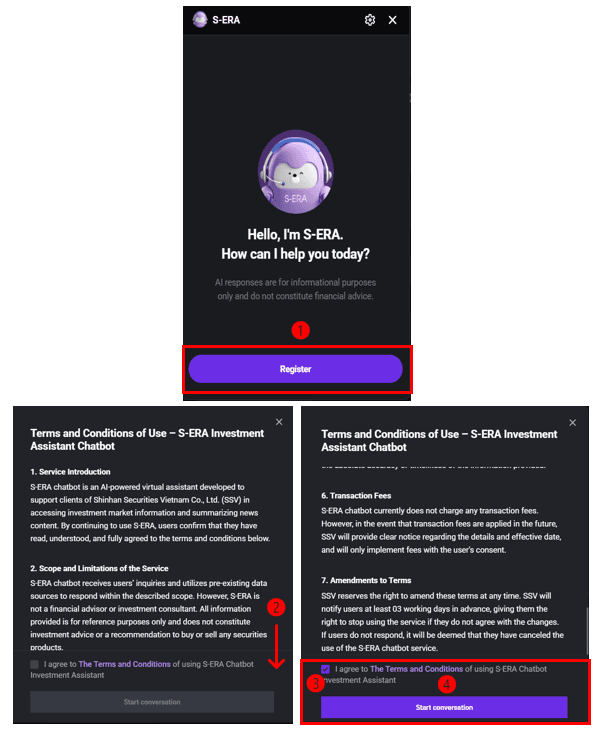
Click the S-ERA icon (top bar or bottom-right corner).
Select Register → Read Terms and Conditions → Tick Agree → Start Conversation.
Ask your question by typing or speaking.
Example: What is the PE ratio of HPG?
Example: Summarize today’s market news.
* If the chatbot doesn’t respond, refresh your screen or restart the app.
2. User controls
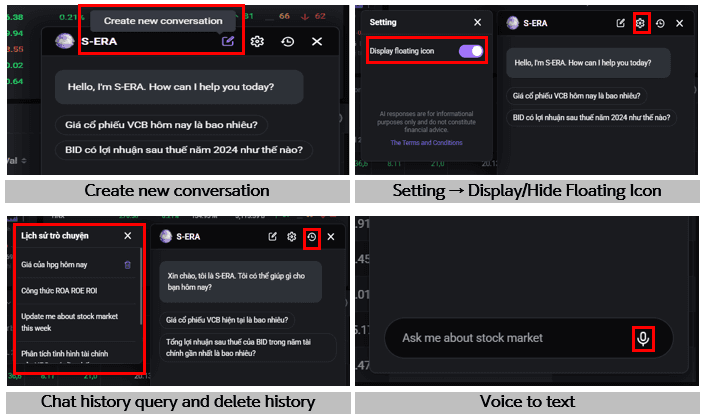
Create new conversation: Start a new chat
Settings → Display floating icon: Show or hide the chatbot icon
History icon: Review or delete past conversations
Microphone icon: Ask questions by voice
Updated: 19 Sept 2026